Choosing Between Cloud and on-Premise Archiving: Pros and Cons for SAP Users
As SAP users modernize their landscapes, efficient data and document archiving is becoming essential. Whether you're preparing for an SAP S/4HANA migration, consolidating systems post-merger, modernizing your data and document archiving stack, or optimizing storage for cost or compliance, the choice between cloud and on-premise archiving plays a pivotal role in cost, performance, and scalability. Each approach offers distinct advantages and trade-offs depending on your infrastructure, regulatory environment, and digital transformation goals.
This blog dives into the key considerations for SAP users evaluating cloud versus on-premise archiving solutions, helping you make the best choice for your enterprise.
Understanding the Basics of Cloud and on-Premise Archiving
On-Premise Archiving involves deploying and maintaining archiving infrastructure within your organization's physical data center (owned or hosted). These systems typically use file servers or enterprise content management (ECM) solutions integrated with SAP via ArchiveLink and/or WebDAV.
Cloud Archiving leverages external, internet-based storage infrastructure (public, private, or hybrid) to host and manage archived data. Cloud archiving platforms often integrate with SAP through RESTful APIs, SAP BTP extensions, or certified connectors.
Key Factors to Consider When Choosing Cloud vs on-Premise Archiving
Cost
- On-Premise: High upfront capital expenditure (CAPEX) for hardware, software licenses, and IT personnel. Ongoing maintenance, upgrades, and support add to total cost of ownership (TCO).
- Cloud: Operates on a subscription or usage-based model (OPEX). Offers predictable costs and scalability. However, long-term costs may accumulate with large data volumes if not optimized.
Scalability and Flexibility
- On-Premise: Limited by physical infrastructure capacity. Scaling requires additional investment and time. Tiering requires additional infrastructure investment.
- Cloud: Offers near-infinite scalability. Organizations can expand or reduce storage as needed, supporting dynamic workloads and seasonal spikes in data. Software-driven data tiering is typically part of the managed platform.
Performance
- On-Premise: Can deliver low-latency access to archived content, especially when tightly coupled with SAP systems in the same network.
- Cloud: Performance depends on internet connectivity and cloud provider infrastructure. Modern cloud systems and object stores now offer high-speed access and caching techniques to minimize latency.
Compliance and Data Residency
- On-Premise: Provides full control over hardware, which can be important for some highly regulated industries (e.g., banking, government, healthcare).
- Cloud: Compliance is achievable through enterprise-grade software-managed compliance, and careful vetting of cloud provider certifications (e.g., ISO 27001, SOC 2). Some regions may restrict data movement across borders.
Security
- On-Premise: Security is managed internally. While this allows for custom controls, it also places full responsibility for breach prevention as well as CVE updates (hardware, OS/DB, software) on your team.
- Cloud: Leading cloud platforms offer advanced encryption, multi-factor authentication, audit logging, and 24/7 monitoring. CVEs at the platform level are fully managed by the providers. Additional shared responsibility models apply for network-level isolation and resource hardening.
Integration with SAP
- On-Premise: Established integration via SAP ArchiveLink, HTTP Content Server, and/or WebDAV and CMIS. Legacy ECMs often require extensive configuration.
- Cloud: Modern platforms integrate using SAP-certified connectors (SAP ArchiveLink, HTTP Content Server, WebDAV, CMIS), BTP Extensions, and REST APIs. These offer greater flexibility and automation options.
Deployment Speed and Maintenance
- On-Premise: Requires time to procure hardware, install software, configure integrations, and test. Maintenance must be performed by in-house or MSP teams.
- Cloud: Fast deployment through managed services or SaaS models. Vendor handles updates, patches, and scaling.
Business Continuity and Disaster Recovery
- On-Premise: Relies on internal DR policies and backup infrastructure. May take longer to recover depending on resources.
- Cloud: Built-in redundancy and high availability ensure resilience. Providers often offer SLA-backed uptime guarantees.
Use Cases for on-Premise Archiving
- Organizations with extraordinary regulatory or sovereign data residency requirements.
- Enterprises with existing investment in extensive on-premise infrastructure that is not written off yet.
- Vendor lock-in scenarios.
- Companies operating in regions with limited or unreliable internet access.
- Businesses with low change rates and minimal need for frequent storage scaling.
Use Cases for Cloud Archiving
- Companies undergoing S/4HANA or cloud transformation projects.
- Organizations seeking agility and scalability in document and data management.
- Businesses operating globally and requiring unified access across regions.
- Enterprises looking to offload infrastructure maintenance and reduce TCO.
Hybrid Approaches
Many enterprises adopt a hybrid model, using on-premise archiving for selected high-security, sensitive workloads and cloud archiving for scalability and ease of access. This model allows SAP users to gradually modernize their infrastructure without disrupting existing systems or heavy negotiation with stakeholders.
How Neev Data Supports Both Models
At Neev Data, we offer flexible, SAP-certified serverless archiving solutions that support both on-premise and cloud environments:
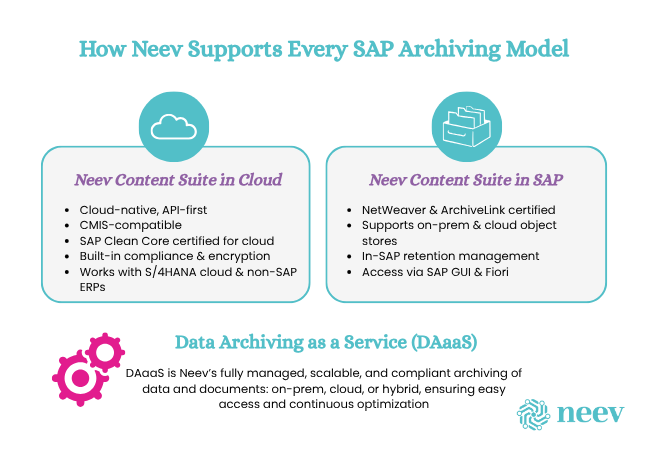
- Neev Content Suite in Cloud: A cloud-native, API-first, CMIS-compatible SAP S/4HANA Cloud Clean Core Certified solution for document and data archiving with built-in compliance, encryption, and auditability. Seamlessly integrates with SAP S/4HANA (RISE, GROW, on-prem), ECC, and non-SAP systems.
- Neev Content Suite in SAP: SAP NetWeaver- and ArchiveLink-Certified archiving for SAP ECC and S/4HANA that supports local/on-premise as well as leading cloud-based object stores. Enables structured "In-SAP" retention management and full access to archived data through SAP GUI or Fiori.
- Data Archiving as a Service (DAaaS): For organizations seeking turnkey archiving, DAaaS provides automated, scalable data and document archiving with ongoing optimization, legal compliance, and transparent access—whether your storage is on-prem, in the cloud, or both.
Choose What Aligns with Your Goals
There is no one-size-fits-all solution when it comes to SAP archiving. The right choice depends on your operational requirements, regulatory obligations, and future growth plans.
- Need flexibility and fast scalability? Cloud is your best bet.
- Managing certain highly sensitive data with strict control? Need to bring your own on-premise—or even a private regulated-industry cloud-based object store? An on-premise / SAP-embedded connector approach may be more suitable.
- Looking for balance? A hybrid strategy offers agility and compliance.
Whichever path you choose, ensure your archiving solution is SAP-certified, scalable, and future-ready.
Interested in streamlining your SAP archiving strategy? Let's talk about a solution that fits your needs.